
简洁大方的评价小程序页面源代码
作者:xlnxin发布时间:2026-09-03分类:编程知识浏览:11561
导读:简洁的评价小程序源码<view class="page"> <!-- 顶部标题 --&...
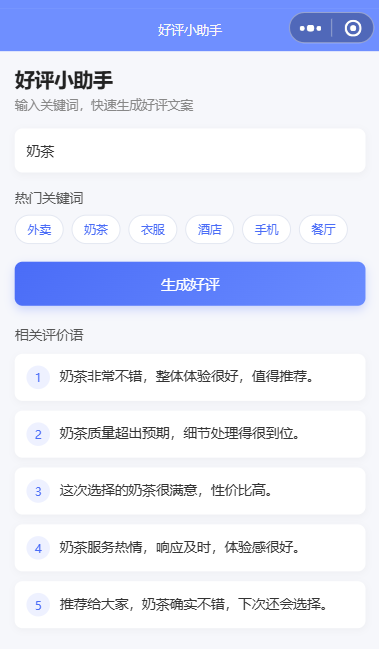
简洁的评价小程序源码
<view class="page">
  <!-- 顶部标题 -->
  <view class="header">
    <text class="title">好评小助手</text>
    <text class="subtitle">输入关键词,快速生成好评文案</text>
  </view>

  <!-- 输入框 -->
  <view class="input-box">
    <input
      class="input"
      placeholder="请输入商品、店铺或服务关键词"
      value="{{keyword}}"
      bindinput="onInput"
    />
  </view>

  <!-- 热门关键词 -->
  <view class="hot-section">
    <text class="hot-title">热门关键词</text>
    <view class="hot-list">
      <view
        class="hot-tag"
        wx:for="{{hotKeywords}}"
        wx:key="index"
        bindtap="onHotTap"
        data-word="{{item}}"
      >
        {{item}}
      </view>
    </view>
  </view>

  <!-- 搜索按钮 -->
  <view class="search-btn" bindtap="onSearch">
    <text>生成好评</text>
  </view>

  <!-- 评价结果列表 -->
  <view class="result-section" wx:if="{{resultList.length > 0}}">
    <text class="result-title">相关评价语</text>

    <view class="result-list">
      <view
        class="result-item"
        wx:for="{{resultList}}"
        wx:key="index"
      >
        <view class="item-index">{{index + 1}}</view>
        <view class="item-text">{{item}}</view>
      </view>
    </view>
  </view>

  <!-- 空状态 -->
  <view class="empty" wx:if="{{hasSearched && resultList.length === 0}}">
    <text>暂无相关评价语</text>
  </view>
</view>
wxss
.page {
  padding: 32rpx;
  background-color: #f6f7fb;
  min-height: 100vh;
  box-sizing: border-box;
}

.header {
  margin-bottom: 32rpx;
}

.title {
  display: block;
  font-size: 40rpx;
  font-weight: 600;
  color: #222;
  margin-bottom: 8rpx;
}

.subtitle {
  display: block;
  font-size: 26rpx;
  color: #888;
}

.input-box {
  background-color: #ffffff;
  border-radius: 16rpx;
  padding: 0 24rpx;
  height: 88rpx;
  display: flex;
  align-items: center;
  box-shadow: 0 4rpx 16rpx rgba(0, 0, 0, 0.04);
}

.input {
  width: 100%;
  font-size: 28rpx;
  color: #333;
}

.hot-section {
  margin-top: 32rpx;
}

.hot-title {
  font-size: 28rpx;
  color: #555;
  margin-bottom: 16rpx;
  display: block;
}

.hot-list {
  display: flex;
  flex-wrap: wrap;
  gap: 16rpx;
}

.hot-tag {
  background-color: #ffffff;
  color: #4a6cf7;
  font-size: 24rpx;
  padding: 12rpx 24rpx;
  border-radius: 32rpx;
  border: 1rpx solid #e3e7f1;
}

.search-btn {
  margin-top: 36rpx;
  height: 88rpx;
  background: linear-gradient(135deg, #4a6cf7, #6a8cff);
  color: #ffffff;
  font-size: 30rpx;
  border-radius: 16rpx;
  display: flex;
  align-items: center;
  justify-content: center;
  box-shadow: 0 8rpx 20rpx rgba(74, 108, 247, 0.25);
}

.result-section {
  margin-top: 40rpx;
}

.result-title {
  font-size: 28rpx;
  color: #555;
  margin-bottom: 20rpx;
  display: block;
}

.result-list {
  display: flex;
  flex-direction: column;
  gap: 20rpx;
}

.result-item {
  background-color: #ffffff;
  border-radius: 16rpx;
  padding: 24rpx;
  display: flex;
  align-items: flex-start;
  box-shadow: 0 4rpx 16rpx rgba(0, 0, 0, 0.04);
}

.item-index {
  width: 48rpx;
  height: 48rpx;
  border-radius: 50%;
  background-color: #eef1ff;
  color: #4a6cf7;
  font-size: 24rpx;
  display: flex;
  align-items: center;
  justify-content: center;
  margin-right: 20rpx;
  flex-shrink: 0;
}

.item-text {
  font-size: 28rpx;
  color: #333;
  line-height: 1.6;
}

.empty {
  margin-top: 60rpx;
  text-align: center;
  color: #999;
  font-size: 26rpx;
}
js代码
Page({
  data: {
    keyword: '',
    hotKeywords: ['外卖', '奶茶', '衣服', '酒店', '手机', '餐厅'],
    resultList: [],
    hasSearched: false
  },

  onInput(e) {
    this.setData({
      keyword: e.detail.value
    });
  },

  onHotTap(e) {
    const word = e.currentTarget.dataset.word;
    this.setData({
      keyword: word
    });
  },

  onSearch() {
    const keyword = this.data.keyword.trim();

    if (!keyword) {
      wx.showToast({
        title: '请输入关键词',
        icon: 'none'
      });
      return;
    }

    // 这里先用模拟数据展示界面效果
    const mockList = [
      `${keyword}非常不错,整体体验很好,值得推荐。`,
      `${keyword}质量超出预期,细节处理得很到位。`,
      `这次选择的${keyword}很满意,性价比高。`,
      `${keyword}服务热情,响应及时,体验感很好。`,
      `推荐给大家,${keyword}确实不错,下次还会选择。`
    ];

    this.setData({
      resultList: mockList,
      hasSearched: true
    });
  }
});
- 编程知识排行
- 最近发表